304 | Facial Recognition System
By Rian Butala
Main Project
In this project, I will design a facial recognition system. Some major libraries were required for this process: facenet-pytorch, and pytorch. I also needed to reconfigure the python environments on my laptop with pyenv, as python had been installed on homebrew which blocked some libaries from being installed. The main plan is as such: Take an image, isolate the most prominent face in it, and run image recognition only on the face.
| Engineer | School | Area of Interest | Grade |
|---|---|---|---|
| Rian B | Stratford Preparatory | Computer Science | Incoming Junior |
Milestone 3
Description
Since I finished my project on week 1, everything here is pretty much what I did since then, and I’ll list it out for readability:
- Trained an emotion recognition model on 26000 images from a dataset (still on resnet because others were much more inaccurate)
- Rewrote detection script to run both models simultaneously
- Created program using netcat to constantly ping a target ip address and port with detection results (client must be using listener program as well)
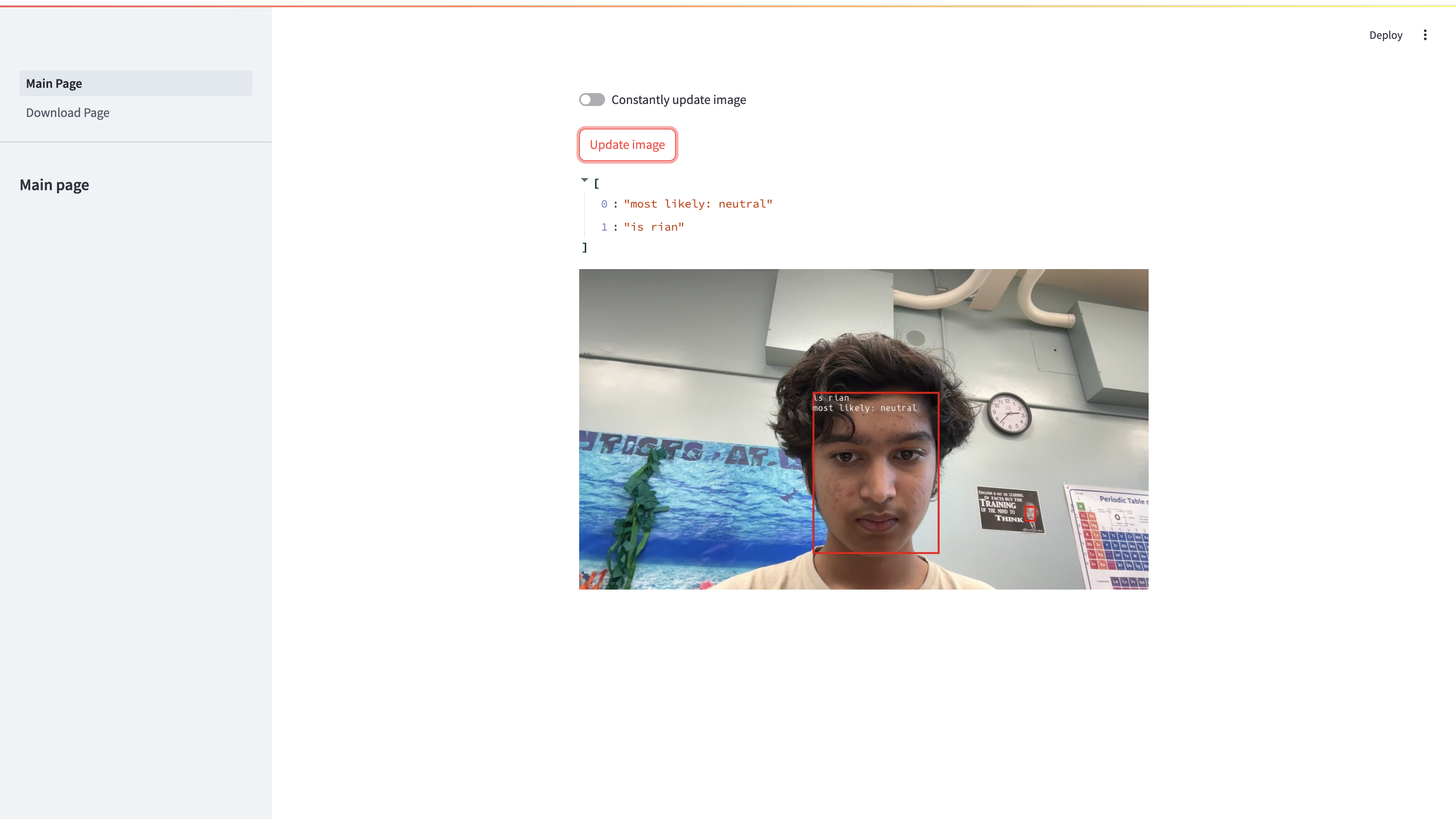
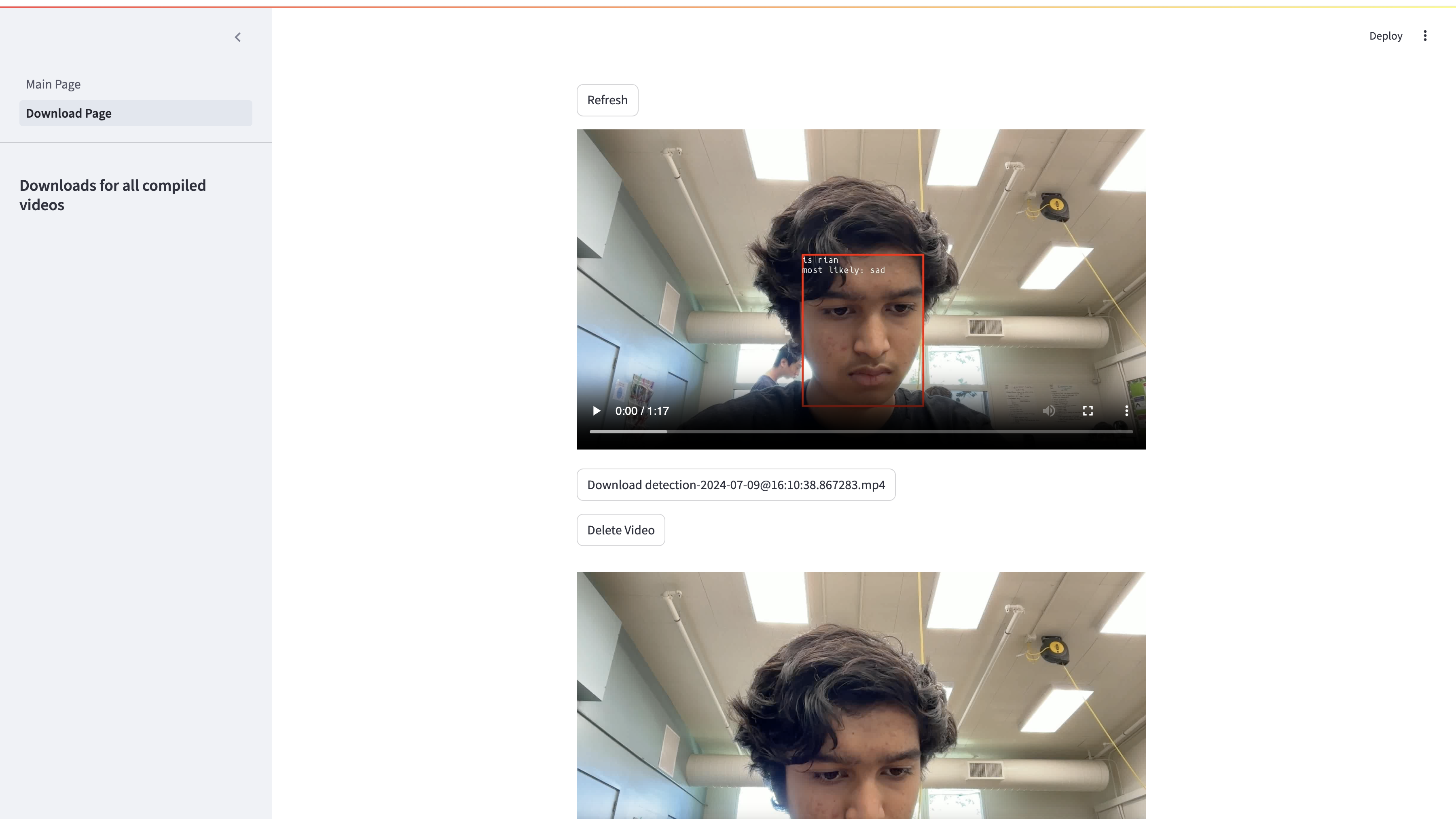
- Overlaid image detection results onto face, so now you can tell directly from the image what the prediction results are
- Created session management system, which will activate once a face is detected. Saves pictures to a directory named detection-xyz and turns off once a face has not been detected for 5 consecutive frames
- Created automatic video compiler, which compiles all the images from detection folder into a video in detections/videos/. Also recompiles into h264 with ffmpeg after initial compile is complete
- Wrote Streamlit website displaying a live video feed from the camera. Users can choose whether to manually update frame or let it auto update
- Created download page for Streamlit so users can view past detection videos and download, delete, or play them in their browser
- Made automatic video deleting system to save storage on host
- Added –headless argument so main program can be run without a display connected
- Added automatic script running on login
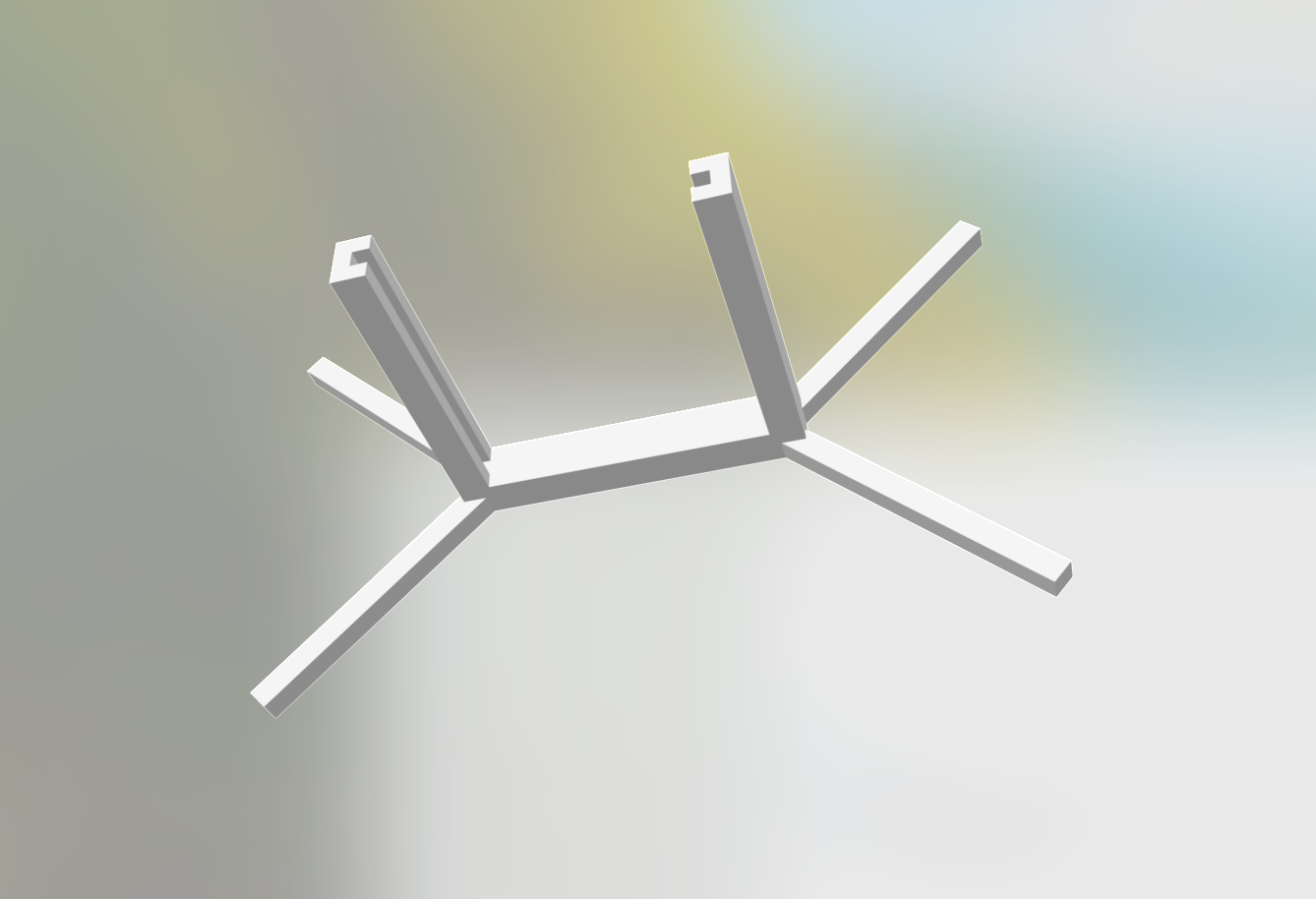
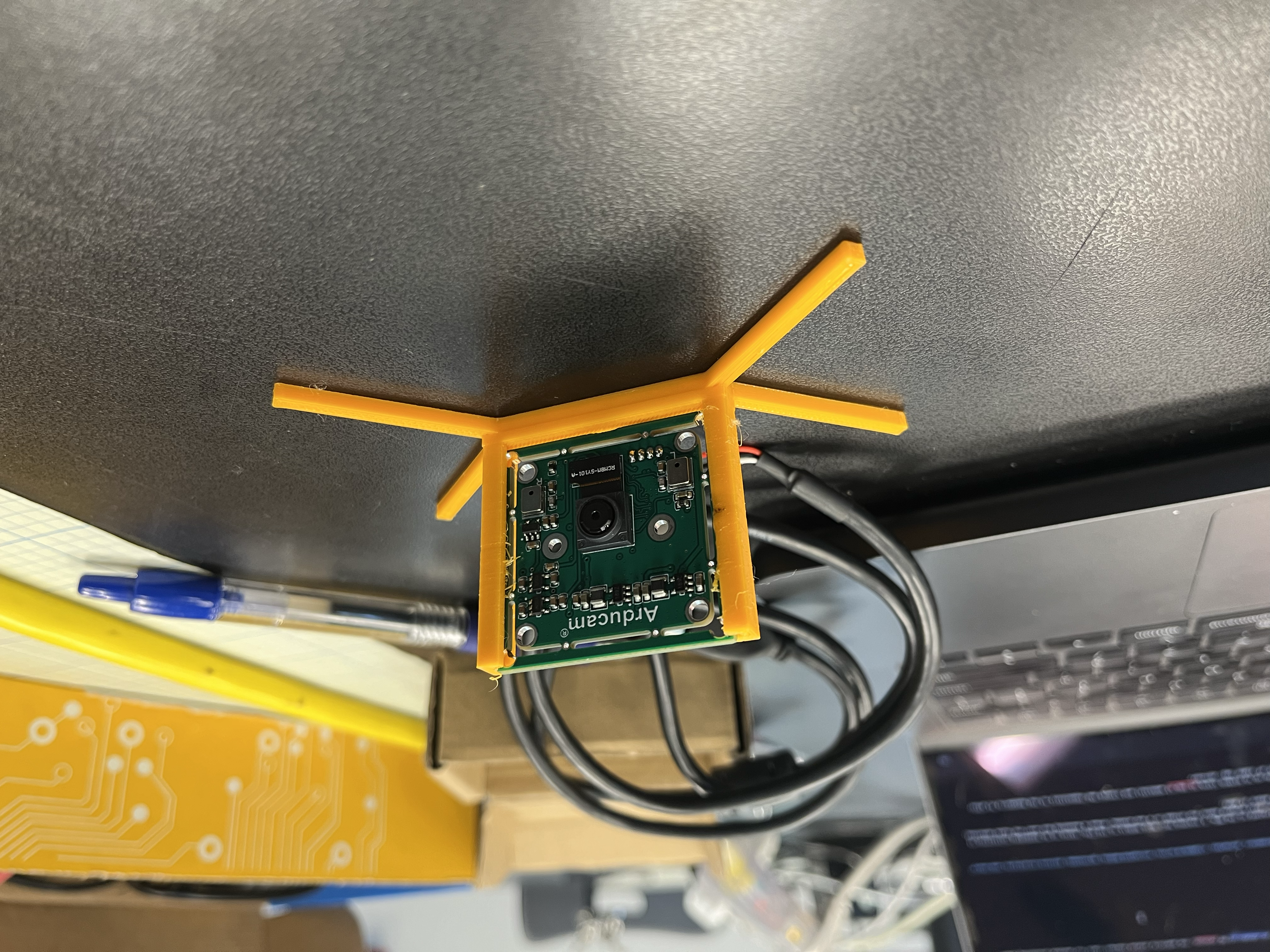
- I also 3d printed a stand for the arducam, as it kept falling over and added a fan to the raspberry pi because the cpu temperatures were in excess of 80 celsius, the publicly stated thermal limit for maximum processing power.
Milestone 2
Description
Since most of my work was already done from the previous milestone, this was much easier to do. Because I knew the model wouldn’t run if trained on the MPS, I trained four more models on the CPU, three on an expanding collection of faces, and one with pictures from a dataset. I also wrote a program that used facenet’s MTCNN (face isolator) and the opencv camera stream. This program opens the stream in a new window, draws a bounding box over the faces detected, and gives a prediction in the shell output to who it thinks the main subject is. An output of 0 means it doesn’t recognize my face, and 1 means it does.
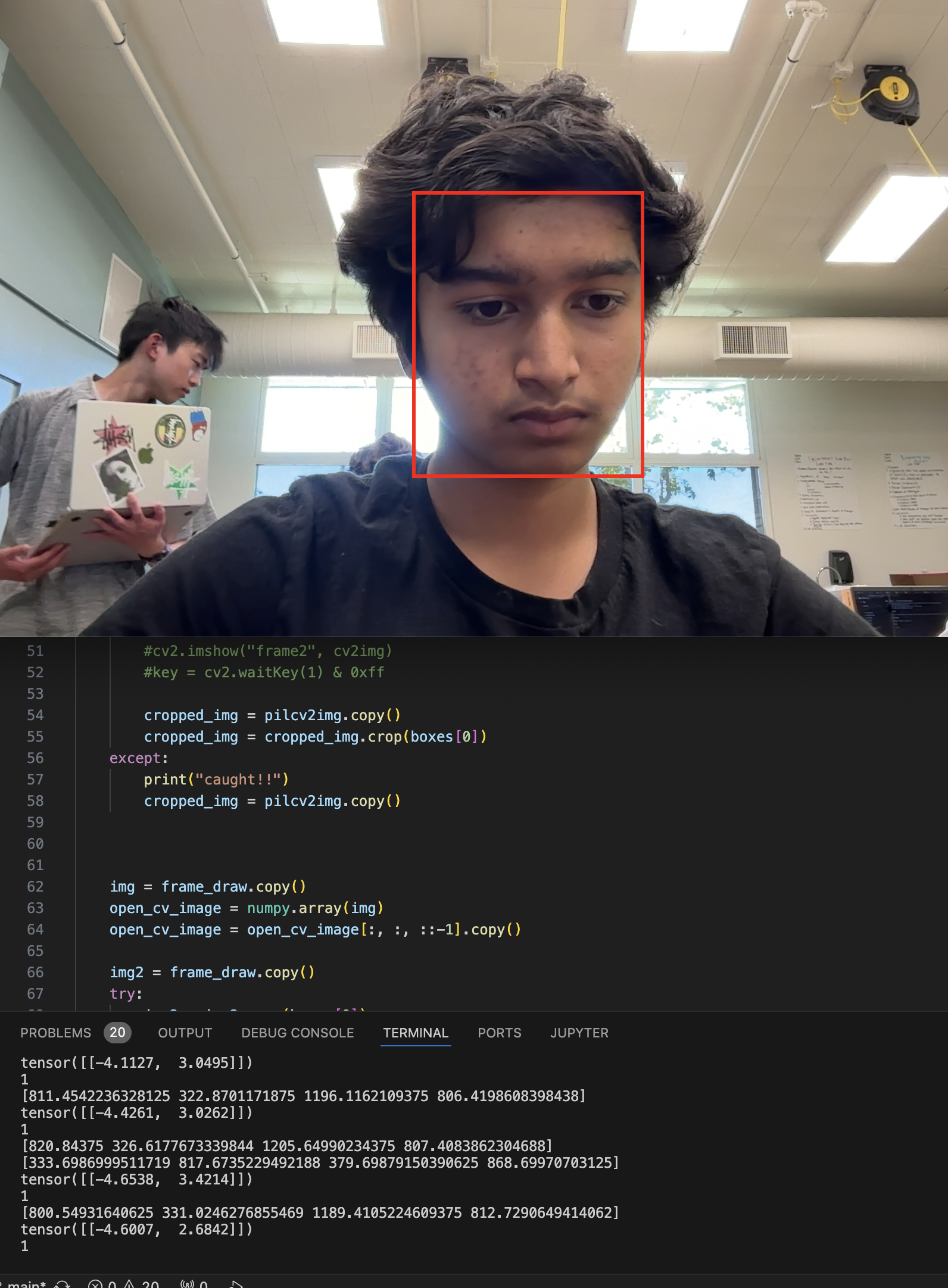
Then, I set up the Rasberry Pi 4 Model B (4gb RAM) I was given and quickly installed all the required libraries. I also backed all my code up to Github (link at top of website) and cloned the repository to the Raspberry Pi after initial setup and testing was done. Soon enough, I got the exact same output on the Raspberry Pi, albeit four times slower and with a lot of video lag.
Accomplishments
Some things that I accomplished in the process of reaching this milestone were:
- Took many more training and validation pictures
- Trained models that were far better to previous ones (model-5 took 95 minutes to train on 1807 images and is by far the most accurate out of all of them)
- Learned how to parse individual pictures in directories with glob and modify with PIL and opencv
Milestone 1
Description
Getting to this stage was quite hard. A number of challenges caused me to be completely lost on many of the operations done up till this point. First, when installing libraries like pytorch, I had to completely reconfigure my python environment with pyenv. I also couldn’t figure out how to load images into the transfer learning model on my own, so I downloaded pytorch’s example notebook and modified it for my use case. However, the biggest issue was with the Apple MPS, or Metal Performance Shaders. The MPS is responisible for graphical compute and, in our case, accelerated performance with machine learning models (I only learned later that it provided a noticeable boost when running models, not training them). Documentation online for this was quite sparse, and I had to download the nightly build of pytorch, which was probably unnecessary, to train on the MPS, in addition to a few tweaks to number formatting for easier compute. Funnily enough, the MPS uses a proprietary type of float type called MPSFloatType, which is not compatible with cpu-bound models using torch.FloatTensor. This meant that the model I trained on my laptop couldn’t be used on the raspberry pi, so I had to train another model on the CPU. It wasn’t that bad, though, as I later ended up training many more models.
Accomplishments
Some things that I accomplished in the process of reaching this milestone were:
- Took majority of training and validation pictures
- Learned how to use pytorch to transfer learn
- Learned how to use the Pillow Imaging Libary
- Learned how to use facenet-pytorch’s MTCNN model to identify and track faces across different frames of photo and video
- Cropped training and validation images to only the faces, eliminating unnecessary background clutter
- Trained primary model on top of resnet18
- Set up python3 virtual environments
Code
This project is almost all code, with the only hardware involved being plug and play. When starting this project, I used Tensorflow’s tutorial and this Medium article to guide me along, but I soon got the hang of it around the second milestone. Here is my rough game plan. First, I had to take pictures using the OpenCV python library and save them to a specified path on my computer.
## Original source from here:
## https://realpython.com/face-detection-in-python-using-a-webcam/

import cv2
import time

video_capture = cv2.VideoCapture(0)
folder = "./img/train/notrian/"

counter = 0
while True:
    #print("loop started")
    # Capture frame-by-frame
    ret, frame = video_capture.read()
    cv2.imshow('Video', frame)
    key = cv2.waitKey(1) & 0xff
    if key == ord('q'):
        print("Exiting...")
        break
    if key  == ord('s'):
        timestr = time.strftime("%Y-%m-%d %H:%M:%S")
        print("Saving image: "+timestr +"c"+str(counter)+ ".jpeg")
        filename = folder + timestr +"c"+str(counter)+ ".jpeg"
        cv2.imwrite(filename, frame)
        counter=counter+1
    if key == 13: ## enter key
        timestr = time.strftime("%Y-%m-%d %H:%M:%S")
        print("Saving image: "+timestr + ".jpeg")
        filename = folder + timestr + ".jpeg"
        cv2.imwrite(filename, frame)

video_capture.release()
cv2.destroyAllWindows()
Then, I needed to isolate all the faces from the pictures and save them separately, as the rest of the image was unnecessary. I ran this program in the form of a python notebook to monitor the code and debug faster, but for convenience have listed it all in a big chunk here.
from facenet_pytorch import MTCNN
import torch
import numpy as np
#import mmcv
import cv2
from PIL import Image, ImageDraw
from IPython import display
import os,glob

device = torch.device('cpu')
print('Running on device: {}'.format(device))

mtcnn = MTCNN(keep_all=True, device=device)

path = "/Users/rianbutala/Rian's projects/Coding/Facial Recognition/img/train/rian"
save_path = "/Users/rianbutala/Rian's projects/Coding/Facial Recognition/cropped/train/rian"

os.chdir(path)

images = []

for file in glob.glob("*.jpeg"):
    with Image.open(file) as img:
        #img.show()
        images.append(file)
print(type(images[0]))


imgs =[]
#print('\rTracking frame: {}'.format(i + 1), end='')

# Detect faces
for count,img in enumerate(images):
    os.chdir(path)
    print(img)
    img = Image.open(img)
    boxes, _ = mtcnn.detect(img)

    # Draw faces
    frame_draw = img.copy()
    draw = ImageDraw.Draw(frame_draw)
    try:
        for box in boxes:
            draw.rectangle(box.tolist(), outline=(255, 0, 0), width=6)
            print(box)

        cropped_img = img.copy()
        cropped_img = cropped_img.crop(boxes[0])
        #d = display.display(cropped_img, display_id=True)
        os.chdir(save_path)
        cropped_img.save("img_"+str(count)+".jpeg")
        print("saved!!")


        # Add to frame list
        imgs.append(frame_draw.resize((640, 360), Image.BILINEAR))
        print('\nDone')
    except:
        print("caught!!")


#d = display.display(imgs[0], display_id=True)
for img in imgs:
    display.display(img,display_id=True)
After that, I trained the model by transfer learning on resnet-18 (also imported from notebook). I had a lot of trouble trying to use Apple’s MPS backend to train the model, as Pytorch had nicer compatibility with CPU and Nvidia CUDA training, but managed to figure it out in the end. However, MPS-trained models cannot be run on the CPU, so I had to redo my training all on the CPU.
import torch
if torch.backends.mps.is_available():
    mps_device = torch.device("mps")
    x = torch.ones(1, device=mps_device)
    print (x)
else:
    print ("MPS device not found.")

# License: BSD

import torch
import torch.nn as nn
import torch.optim as optim
from torch.optim import lr_scheduler
import torch.backends.cudnn as cudnn
import numpy as np
import torchvision
from torchvision import datasets, models, transforms
import matplotlib.pyplot as plt
import time
import os
from PIL import Image
from tempfile import TemporaryDirectory

cudnn.benchmark = True
plt.ion()   # interactive mode


# Data augmentation and normalization for training
# Just normalization for validation
data_transforms = {
    'train': transforms.Compose([
        transforms.RandomResizedCrop(224),
        transforms.RandomHorizontalFlip(),
        transforms.ToTensor(),
        transforms.Normalize([0.485, 0.456, 0.406], [0.229, 0.224, 0.225])
    ]),
    'val': transforms.Compose([
        transforms.Resize(256),
        transforms.CenterCrop(224),
        transforms.ToTensor(),
        transforms.Normalize([0.485, 0.456, 0.406], [0.229, 0.224, 0.225])
    ]),
}

data_dir = 'cropped'
image_datasets = {x: datasets.ImageFolder(os.path.join(data_dir, x),
                                          data_transforms[x])
                  for x in ['train', 'val']}
dataloaders = {x: torch.utils.data.DataLoader(image_datasets[x], batch_size=16,
                                             shuffle=True, num_workers=14) #changed from batch size 4 and num workers 4
              for x in ['train', 'val']}
dataset_sizes = {x: len(image_datasets[x]) for x in ['train', 'val']}
class_names = image_datasets['train'].classes
print(class_names[0])

#device = torch.device("cuda:0" if torch.cuda.is_available() else "cpu")
device = torch.device('cpu')


def imshow(inp, title=None):
    """Display image for Tensor."""
    inp = inp.numpy().transpose((1, 2, 0))
    mean = np.array([0.485, 0.456, 0.406])
    std = np.array([0.229, 0.224, 0.225])
    inp = std * inp + mean
    inp = np.clip(inp, 0, 1)
    plt.imshow(inp)
    if title is not None:
        plt.title(title)
    plt.pause(0.001)  # pause a bit so that plots are updated


# Get a batch of training data
inputs, classes = next(iter(dataloaders['train']))

# Make a grid from batch
out = torchvision.utils.make_grid(inputs)


#show a few images
imshow(out, title=[class_names[x] for x in classes])

def train_model(model, criterion, optimizer, scheduler, num_epochs=25):
    since = time.time()

    # Create a temporary directory to save training checkpoints
    with TemporaryDirectory() as tempdir:
        best_model_params_path = os.path.join(tempdir, 'best_model_params.pt')

        torch.save(model.state_dict(), best_model_params_path)
        best_acc = 0.0

        for epoch in range(num_epochs):
            print(f'Epoch {epoch}/{num_epochs - 1}')
            print('-' * 10)

            # Each epoch has a training and validation phase
            for phase in ['train', 'val']:
                if phase == 'train':
                    model.train()  # Set model to training mode
                else:
                    model.eval()   # Set model to evaluate mode

                running_loss = 0.0
                running_corrects = 0

                # Iterate over data.
                for inputs, labels in dataloaders[phase]:
                    inputs = inputs.to(device)
                    labels = labels.to(device)

                    # zero the parameter gradients
                    optimizer.zero_grad()

                    # forward
                    # track history if only in train
                    with torch.set_grad_enabled(phase == 'train'):
                        outputs = model(inputs)
                        _, preds = torch.max(outputs, 1)
                        loss = criterion(outputs, labels)

                        # backward + optimize only if in training phase
                        if phase == 'train':
                            loss.backward()
                            optimizer.step()

                    # statistics
                    running_loss += loss.item() * inputs.size(0)
                    running_corrects += torch.sum(preds == labels.data)
                if phase == 'train':
                    scheduler.step()

                epoch_loss = running_loss / dataset_sizes[phase]
                epoch_acc = running_corrects.float() / dataset_sizes[phase]

                print(f'{phase} Loss: {epoch_loss:.4f} Acc: {epoch_acc:.4f}')

                # deep copy the model
                if phase == 'val' and epoch_acc > best_acc:
                    best_acc = epoch_acc
                    torch.save(model.state_dict(), best_model_params_path)

            print()

        time_elapsed = time.time() - since
        print(f'Training complete in {time_elapsed // 60:.0f}m {time_elapsed % 60:.0f}s')
        print(f'Best val Acc: {best_acc:4f}')

        # load best model weights
        model.load_state_dict(torch.load(best_model_params_path))
    return model

def visualize_model(model, num_images=6):
    was_training = model.training
    model.eval()
    images_so_far = 0
    fig = plt.figure()

    with torch.no_grad():
        for i, (inputs, labels) in enumerate(dataloaders['val']):
            inputs = inputs.to(device)
            labels = labels.to(device)

            outputs = model(inputs)
            _, preds = torch.max(outputs, 1)

            for j in range(inputs.size()[0]):
                images_so_far += 1
                ax = plt.subplot(num_images//2, 2, images_so_far)
                ax.axis('off')
                ax.set_title(f'predicted: {class_names[preds[j]]}')
                imshow(inputs.cpu().data[j])

                if images_so_far == num_images:
                    model.train(mode=was_training)
                    return
        model.train(mode=was_training)


model_ft = models.resnet18(weights='IMAGENET1K_V1')
#model_ft = facenet_pytorch.InceptionResnetV1(pretrained='vggface2', device=device, classify= True, num_classes=1)


num_ftrs = model_ft.fc.in_features

# Here the size of each output sample is set to 2.
# Alternatively, it can be generalized to ``nn.Linear(num_ftrs, len(class_names))``.

model_ft.fc = nn.Linear(num_ftrs, 2)

model_ft = model_ft.to(device)

criterion = nn.CrossEntropyLoss()
#criterion = nn.BCEWithLogitsLoss()


# Observe that all parameters are being optimized
optimizer_ft = optim.SGD(model_ft.parameters(), lr=0.001, momentum=0.9)

# Decay LR by a factor of 0.1 every 7 epochs
exp_lr_scheduler = lr_scheduler.StepLR(optimizer_ft, step_size=7, gamma=0.1)

model_ft = train_model(model_ft, criterion, optimizer_ft, exp_lr_scheduler,
                       num_epochs=25)

visualize_model(model_ft)

torch.save(model_ft, "model_ft.pt")
At the end of that file, we save the model as ‘model_ft.pt’ for later use, and deployment on the Raspberry Pi, as I obviously can’t train the model on it. Here’s a small piece of code that lets me test the trained model on the same set of images.
# License: BSD

import torch
import torch.nn as nn
import torch.optim as optim
from torch.optim import lr_scheduler
import torch.backends.cudnn as cudnn
import numpy as np
import torchvision
from torchvision import datasets, models, transforms
import matplotlib.pyplot as plt
import time
import os
from PIL import Image
from tempfile import TemporaryDirectory

cudnn.benchmark = True
plt.ion()   # interactive mode

# Data augmentation and normalization for training
# Just normalization for validation
data_transforms = {
    'train': transforms.Compose([
        transforms.RandomResizedCrop(224),
        transforms.RandomHorizontalFlip(),
        transforms.ToTensor(),
        transforms.Normalize([0.485, 0.456, 0.406], [0.229, 0.224, 0.225])
    ]),
    'val': transforms.Compose([
        transforms.Resize(256),
        transforms.CenterCrop(224),
        transforms.ToTensor(),
        transforms.Normalize([0.485, 0.456, 0.406], [0.229, 0.224, 0.225])
    ]),
}

data_dir = "/Users/rianbutala/Rian's projects/Coding/Facial Recognition/cropped"
image_datasets = {x: datasets.ImageFolder(os.path.join(data_dir, x),
                                          data_transforms[x])
                  for x in ['train', 'val']}
dataloaders = {x: torch.utils.data.DataLoader(image_datasets[x], batch_size=16,
                                             shuffle=True, num_workers=14) #changed from batch size 4 and num workers 4
              for x in ['train', 'val']}
dataset_sizes = {x: len(image_datasets[x]) for x in ['train', 'val']}
class_names = image_datasets['train'].classes


model_ft = torch.load("model_ft.pt")

#device = torch.device("cuda:0" if torch.cuda.is_available() else "cpu")
device = torch.device('mps:0')

def imshow(inp, title=None):
    """Display image for Tensor."""
    inp = inp.numpy().transpose((1, 2, 0))
    mean = np.array([0.485, 0.456, 0.406])
    std = np.array([0.229, 0.224, 0.225])
    inp = std * inp + mean
    inp = np.clip(inp, 0, 1)
    plt.imshow(inp)
    if title is not None:
        plt.title(title)
    plt.pause(0.001)  # pause a bit so that plots are updated


# Get a batch of training data
inputs, classes = next(iter(dataloaders['train']))

# Make a grid from batch
out = torchvision.utils.make_grid(inputs)

imshow(out, title=[class_names[x] for x in classes])

def visualize_model(model, num_images=6):
    was_training = model.training
    model.eval()
    images_so_far = 0
    fig = plt.figure()

    with torch.no_grad():
        for i, (inputs, labels) in enumerate(dataloaders['val']):
            inputs = inputs.to(device)
            labels = labels.to(device)

            outputs = model(inputs)
            _, preds = torch.max(outputs, 1)

            for j in range(inputs.size()[0]):
                images_so_far += 1
                ax = plt.subplot(num_images//2, 2, images_so_far)
                ax.axis('off')
                ax.set_title(f'predicted: {class_names[preds[j]]}')
                imshow(inputs.cpu().data[j])

                if images_so_far == num_images:
                    model.train(mode=was_training)
                    return
        model.train(mode=was_training)

visualize_model(model_ft)
Now, let’s start using the model with the camera stream. Because the previous block of code ran the recognizer on a precropped image, we’ll need to develop a new program to take an image file, crop it, and run predictions.
import torchvision.transforms as transforms
import torchvision.datasets as datasets
from torch.utils.data import DataLoader,Dataset
from PIL import Image
import matplotlib.pyplot as plt
import numpy as np
import cv2
import time
import torch
import torch.nn as nn
import torch.optim as optim
from torch.optim import lr_scheduler
import torch.backends.cudnn as cudnn
import numpy as np
import torchvision
from torchvision import datasets, models, transforms
import matplotlib.pyplot as plt
import time
import os
from PIL import Image, ImageDraw
from tempfile import TemporaryDirectory
from facenet_pytorch import MTCNN
import numpy

video_capture = cv2.VideoCapture(0)

model_ft = torch.load("model_ft_3.pt")

device = torch.device('cpu')

mtcnn = MTCNN(keep_all=True, device=device)

image_path = ""

def pre_image(model, image_path):
    #img = Image.open(image_path)
    cv2img =cv2.imread(image_path)

    #_,cv2img = video_capture.read()
    boxes, _ = mtcnn.detect(cv2img)

    color_converted = cv2.cvtColor(cv2img, cv2.COLOR_BGR2RGB)

    pilcv2img = Image.fromarray(color_converted).copy()

    frame_draw = pilcv2img.copy()
    draw = ImageDraw.Draw(frame_draw)


    try:
        for box in boxes:
            draw.rectangle(box.tolist(), outline=(255, 0, 0), width=6)
            print(box)
        #frame_draw.show()
        #cv2.imshow("frame2", cv2img)
        #key = cv2.waitKey(1) & 0xff

        cropped_img = pilcv2img.copy()
        cropped_img = cropped_img.crop(boxes[0])
    except:
        print("caught!!")
        cropped_img = pilcv2img.copy()


    img = frame_draw.copy()
    open_cv_image = numpy.array(img)
    open_cv_image = open_cv_image[:, :, ::-1].copy()

    img2 = frame_draw.copy()
    try:
        img2 = img2.crop(boxes[0])
    except:
        pass
    open_cv_image2 = numpy.array(img2)
    open_cv_image2 = open_cv_image2[:, :, ::-1].copy()


    cv2.imshow("rect-frame", open_cv_image)
    key = cv2.waitKey(1) & 0xff


    mean = [0.485, 0.456, 0.406]
    std = [0.229, 0.224, 0.225]
    transform_norm = transforms.Compose([transforms.ToTensor(),
    transforms.Resize((224,224)),transforms.Normalize(mean, std)])
    # get normalized image

    try:
        img_normalized = transform_norm(img.crop(boxes[0])).float()
        img_normalized = img_normalized.unsqueeze_(0)
        # input = Variable(image_tensor)
        img_normalized = img_normalized.to(device)
        # print(img_normalized.shape)

    except:
        img_normalized = transform_norm(img).float()
        img_normalized = img_normalized.unsqueeze_(0)
        # input = Variable(image_tensor)
        img_normalized = img_normalized.to(device)
        print("didn't crop")
        # print(img_normalized.shape)

    with torch.no_grad():
        model.eval()
        output =model(img_normalized)
        print(output)
        index = output.data.cpu().numpy().argmax()
        print(index)
        #classes = train_ds.classes
        #class_name = classes[index]
        #return class_name

_,img = video_capture.read()
#cv2.imshow("Frame",img)

pre_image(model_ft, "/Users/rianbutala/Rian's projects/Coding/Facial Recognition/bse_face_recognition/tester_image.jpeg")
    #time.sleep(0.1)
#time.sleep(10)
cv2.waitKey(0)

cv2.destroyAllWindows()
And now, with a few modifications, we can run the model on a video stream:
import torchvision.transforms as transforms
import torchvision.datasets as datasets
from torch.utils.data import DataLoader,Dataset
from PIL import Image
import matplotlib.pyplot as plt
import numpy as np
import cv2
import time
import torch
import torch.nn as nn
import torch.optim as optim
from torch.optim import lr_scheduler
import torch.backends.cudnn as cudnn
import numpy as np
import torchvision
from torchvision import datasets, models, transforms
import matplotlib.pyplot as plt
import time
import os
from PIL import Image, ImageDraw
from tempfile import TemporaryDirectory
from facenet_pytorch import MTCNN
import numpy

video_capture = cv2.VideoCapture(0)

model_ft = torch.load("model_ft_4.pt")

device = torch.device('cpu')

mtcnn = MTCNN(keep_all=True, device=device)

def pre_image(model):
    #img = Image.open(image_path)
    _,cv2img = video_capture.read()
    boxes, _ = mtcnn.detect(cv2img)

    color_converted = cv2.cvtColor(cv2img, cv2.COLOR_BGR2RGB)

    pilcv2img = Image.fromarray(color_converted).copy()

    frame_draw = pilcv2img.copy()
    draw = ImageDraw.Draw(frame_draw)


    try:
        for box in boxes:
            draw.rectangle(box.tolist(), outline=(255, 0, 0), width=6)
            print(box)
        #frame_draw.show()
        #cv2.imshow("frame2", cv2img)
        #key = cv2.waitKey(1) & 0xff

        cropped_img = pilcv2img.copy()
        cropped_img = cropped_img.crop(boxes[0])
    except:
        print("caught!!")
        cropped_img = pilcv2img.copy()


    img = frame_draw.copy()
    open_cv_image = numpy.array(img)
    open_cv_image = open_cv_image[:, :, ::-1].copy()

    img2 = frame_draw.copy()
    try:
        img2 = img2.crop(boxes[0])
    except:
        pass
    open_cv_image2 = numpy.array(img2)
    open_cv_image2 = open_cv_image2[:, :, ::-1].copy()


    cv2.imshow("rect-frame", open_cv_image)
    key = cv2.waitKey(1) & 0xff


    mean = [0.485, 0.456, 0.406]
    std = [0.229, 0.224, 0.225]
    transform_norm = transforms.Compose([transforms.ToTensor(),
    transforms.Resize((224,224)),transforms.Normalize(mean, std)])
    # get normalized image

    try:
        img_normalized = transform_norm(img.crop(boxes[0])).float()
        img_normalized = img_normalized.unsqueeze_(0)
        # input = Variable(image_tensor)
        img_normalized = img_normalized.to(device)
        # print(img_normalized.shape)

    except:
        img_normalized = transform_norm(img).float()
        img_normalized = img_normalized.unsqueeze_(0)
        # input = Variable(image_tensor)
        img_normalized = img_normalized.to(device)
        print("didn't crop")
        # print(img_normalized.shape)

    with torch.no_grad():
        model.eval()
        output =model(img_normalized)
        print(output)
        index = output.data.cpu().numpy().argmax()
        print(index)
        #classes = train_ds.classes
        #class_name = classes[index]
        #return class_name

_,img = video_capture.read()
#cv2.imshow("Frame",img)

while(True):
    pre_image(model_ft)
    #time.sleep(0.1)
#time.sleep(10)
cv2.waitKey(0)

cv2.destroyAllWindows()
Alright! Let’s train the emotion model.
# License: BSD

import torch
import torch.nn as nn
import torch.optim as optim
from torch.optim import lr_scheduler
import torch.backends.cudnn as cudnn
import numpy as np
import torchvision
from torchvision import datasets, models, transforms
import matplotlib.pyplot as plt
import time
import os
from PIL import Image
from tempfile import TemporaryDirectory
from facenet_pytorch import InceptionResnetV1

cudnn.benchmark = True
plt.ion()   # interactive mode

# Data augmentation and normalization for training
# Just normalization for validation
data_transforms = {
    'train': transforms.Compose([
        transforms.RandomResizedCrop(224),
        transforms.RandomHorizontalFlip(),
        transforms.ToTensor(),
        transforms.Normalize([0.485, 0.456, 0.406], [0.229, 0.224, 0.225])
    ]),
    'val': transforms.Compose([
        transforms.Resize(256),
        transforms.CenterCrop(224),
        transforms.ToTensor(),
        transforms.Normalize([0.485, 0.456, 0.406], [0.229, 0.224, 0.225])
    ]),
}

data_dir = 'emotion_pictures/img'
image_datasets = {x: datasets.ImageFolder(os.path.join(data_dir, x),
                                          data_transforms[x])
                  for x in ['train', 'val']}
dataloaders = {x: torch.utils.data.DataLoader(image_datasets[x], batch_size=64,
                                             shuffle=True, num_workers=14) #changed from batch size 4 and num workers 4
              for x in ['train', 'val']}
dataset_sizes = {x: len(image_datasets[x]) for x in ['train', 'val']}
class_names = image_datasets['train'].classes
print(class_names[0])

#device = torch.device("cuda:0" if torch.cuda.is_available() else "cpu")
device = torch.device('cpu')

def imshow(inp, title=None):
    """Display image for Tensor."""
    inp = inp.numpy().transpose((1, 2, 0))
    mean = np.array([0.485, 0.456, 0.406])
    std = np.array([0.229, 0.224, 0.225])
    inp = std * inp + mean
    inp = np.clip(inp, 0, 1)
    plt.imshow(inp)
    if title is not None:
        plt.title(title)
    plt.pause(0.001)  # pause a bit so that plots are updated


# Get a batch of training data
inputs, classes = next(iter(dataloaders['train']))

# Make a grid from batch
#out = torchvision.utils.make_grid(inputs)

#imshow(out, title=[class_names[x] for x in classes])

def train_model(model, criterion, optimizer, scheduler, num_epochs=25):
    since = time.time()

    # Create a temporary directory to save training checkpoints
    with TemporaryDirectory() as tempdir:
        best_model_params_path = os.path.join(tempdir, 'best_model_params.pt')

        torch.save(model.state_dict(), best_model_params_path)
        best_acc = 0.0

        for epoch in range(num_epochs):
            print(f'Epoch {epoch}/{num_epochs - 1}')
            print('-' * 10)

            # Each epoch has a training and validation phase
            for phase in ['train', 'val']:
                if phase == 'train':
                    model.train()  # Set model to training mode
                else:
                    model.eval()   # Set model to evaluate mode

                running_loss = 0.0
                running_corrects = 0

                # Iterate over data.
                for inputs, labels in dataloaders[phase]:
                    inputs = inputs.to(device)
                    labels = labels.to(device)

                    # zero the parameter gradients
                    optimizer.zero_grad()

                    # forward
                    # track history if only in train
                    with torch.set_grad_enabled(phase == 'train'):
                        outputs = model(inputs)
                        _, preds = torch.max(outputs, 1)
                        loss = criterion(outputs, labels)

                        # backward + optimize only if in training phase
                        if phase == 'train':
                            loss.backward()
                            optimizer.step()

                    # statistics
                    running_loss += loss.item() * inputs.size(0)
                    running_corrects += torch.sum(preds == labels.data)
                if phase == 'train':
                    scheduler.step()

                epoch_loss = running_loss / dataset_sizes[phase]
                epoch_acc = running_corrects.float() / dataset_sizes[phase]

                print(f'{phase} Loss: {epoch_loss:.4f} Acc: {epoch_acc:.4f}')

                # deep copy the model
                if phase == 'val' and epoch_acc > best_acc:
                    best_acc = epoch_acc
                    torch.save(model.state_dict(), best_model_params_path)

            print()

        time_elapsed = time.time() - since
        print(f'Training complete in {time_elapsed // 60:.0f}m {time_elapsed % 60:.0f}s')
        print(f'Best val Acc: {best_acc:4f}')

        # load best model weights
        model.load_state_dict(torch.load(best_model_params_path))
    return model

def visualize_model(model, num_images=6):
    was_training = model.training
    model.eval()
    images_so_far = 0
    fig = plt.figure()

    with torch.no_grad():
        for i, (inputs, labels) in enumerate(dataloaders['val']):
            inputs = inputs.to(device)
            labels = labels.to(device)

            outputs = model(inputs)
            _, preds = torch.max(outputs, 1)

            for j in range(inputs.size()[0]):
                images_so_far += 1
                ax = plt.subplot(num_images//2, 2, images_so_far)
                ax.axis('off')
                ax.set_title(f'predicted: {class_names[preds[j]]}')
                imshow(inputs.cpu().data[j])

                if images_so_far == num_images:
                    model.train(mode=was_training)
                    return
        model.train(mode=was_training)

model_ft = models.resnet18(weights='IMAGENET1K_V1')
#model_ft = facenet_pytorch.InceptionResnetV1(pretrained='vggface2', device=device, classify= True, num_classes=1)


num_ftrs = model_ft.fc.in_features

# Here the size of each output sample is set to 2.
# Alternatively, it can be generalized to ``nn.Linear(num_ftrs, len(class_names))``.

model_ft.fc = nn.Linear(num_ftrs, len(class_names))

model_ft = model_ft.to(device)

criterion = nn.CrossEntropyLoss()
#criterion = nn.BCEWithLogitsLoss()


# Observe that all parameters are being optimized
optimizer_ft = optim.SGD(model_ft.parameters(), lr=0.001, momentum=0.9)

# Decay LR by a factor of 0.1 every 7 epochs
exp_lr_scheduler = lr_scheduler.StepLR(optimizer_ft, step_size=7, gamma=0.1)

model_ft = train_model(model_ft, criterion, optimizer_ft,
                         exp_lr_scheduler, num_epochs=25)

visualize_model(model_ft)

torch.save(model_ft, "emotion_model_ft_resnet_cpu.pt")
A lot of this code is repeated, and honestly I would recommend you check out the code repository if you want to see this presented in a readable format.
Here’s some boiler plate code for netcat file transfer:
import os, subprocess, time

'''def transmit_message_scp(message, username ,ip , filepath, remotepassword):
    os.popen("touch temp.txt")
    file = open("temp.txt", "w+")
    file.write(message)
    file.close()
    process = subprocess.Popen(("scp temp.txt "+username+"@"+ip+":"+filepath).split(), stdin = subprocess.PIPE)
    process.communicate(bytes(str(remotepassword), encoding='utf8'))
    os.popen("rm temp.txt")'''

def transmit_message(message, ip, port):
    os.popen("cd temp && touch temp_status_message.txt")
    file = open("temp/temp_status_message.txt", "w+")
    message = message
    file.write(message)
    file.close()
    subprocess.Popen("nc "+ip+" "+port+" -w 1 < temp/temp_status_message.txt", stdin=subprocess.PIPE, shell=True)
    #os.popen("rm temp/temp_status_message.txt")

def monitor_for_message(port):
    process = subprocess.Popen("nc -l "+port, stdout=subprocess.PIPE,shell=True)
    read = str(process.stdout.readlines())[3:-4]
    #raw output: [b'nah id lose\n']
    print(read)
This is probably the most important file for image and video operations other than the main looping file itself:
import cv2
import os, subprocess

def get_avg_diff(inp_list, verbose):
    target_list = []
    for count, i in enumerate(inp_list):
        try:
            target_list.append(inp_list[count+1]-inp_list[count])
        except:
            pass

    avg = 0
    for i in target_list:
        avg += i
    avg = avg/len(target_list)

    if verbose:
        print(avg) # seconds per frame
    # fps is 1/this
    return avg


def compile_video(directory_name, verbose):
    try:
        target_fps = 0

        image_folder = 'detections/'+directory_name+"/"
        video_name = 'detections/videos/cv'+directory_name+'.mp4'
        final_video_name = 'detections/videos/'+directory_name+'.mp4'
        print(f"Video name: {video_name}. FFMPEG video name: {final_video_name}")

        images = []
        secondslist = []
        for img in os.listdir(image_folder):
            images.append(img)
            seconds = (int(img[-13:-11]+img[-10:-4])/1000000) #convert filenames into seconds
            if verbose:
                print(img)
            minutes = (seconds+60*int(img[-16:-14])) #converts minutes to seconds
            minutes = minutes+60*60*int(img[-19:-17])
            secondslist.append(minutes)
        secondslist = sorted(secondslist)
        if verbose:
            print(tuple(i for i in secondslist))
        fps = 1/get_avg_diff(secondslist, verbose)
        target_fps = fps
        if verbose:
            print("fps generated: "+str(target_fps))

        frame = cv2.imread(os.path.join(image_folder, images[0]))
        height, width, layers = frame.shape

        video = cv2.VideoWriter(video_name, cv2.VideoWriter.fourcc(*'mp4v'), target_fps, (width,height), True)
        #os.popen("ffmpeg -framerate "+str(target_fps)+"-i "+image_folder+"image-%d.jpg -c:v libx264 -r 30 output.mp4")

        images = sorted(images)
        for image in images:
            video.write(cv2.imread(os.path.join(image_folder, image)))

        cv2.destroyAllWindows()
        video.release()

        print("ffmpeg starting")
        process = subprocess.call(["ffmpeg -i "+video_name+" -vcodec libx264 "+final_video_name], stdout=subprocess.PIPE, shell=True)
        process = subprocess.call(["rm "+video_name], stdout=subprocess.PIPE, shell=True)
        print("ffmpeg ended. video removed.")
    except Exception as e:
        print("critical error!!")
        print(e)

def get_date(filename, verbose):
    index_dash = 0
    index_atsign = 0

    for count, i in enumerate(filename):
        if i == "-" and index_dash == 0:
            index_dash = count
        if i == "@" and index_atsign == 0:
            index_atsign = count

    if verbose:
        print(filename[index_dash+1:index_atsign].split("-")) # 2024, 06, 26: y/m/d

    return (filename[index_dash+1:index_atsign].split("-"))

def is_file_too_old(baseline, comparison, days, verbose): #with some caveats. for simplicity if year or month doesnt match it says too old.
    if verbose:
        print(f"checking to see if {comparison} is {days} days older than {baseline}")

    date_baseline = get_date(baseline, verbose)
    date_comparison = get_date(comparison, verbose)

    if int(date_baseline[0]) - int(date_comparison[0]) != 0: #if year is different
        if verbose:
            print ("year mismatch!!")
        return True

    if int(date_baseline[1]) - int(date_comparison[1]) != 0: #if month is different
        if verbose:
            print ("month mismatch!!")
        return True
    else:
        is_date_mismatch = int(date_baseline[2]) - int(date_comparison[2]) > days
        if verbose:
            if is_date_mismatch:
                print("date mismatch!!")
            else:
                print("file fits criteria!!")
        return is_date_mismatch

#compile_video("wdetection-2024-07-01@15:04:43.236809", True)
#get_date("detection-2024-06-26@16:22:17.826271")

#print(is_file_too_old("detection-2024-07-01@16:22:17.826271", "detection-2024-06-26@16:22:17.826271", 7, True))

def autoremove_old_files(directory_name, days, verbose):
    process = subprocess.Popen([f"ls {directory_name}"], shell=True, stdout=subprocess.PIPE)

    files = tuple(i.decode()[:-1] for i in process.stdout.readlines()) # old output looked like ('detection-2024-06-01@13:03:18.445190.mp4\n', 'detection-2024-07-01@13:04:49.685851.mp4\n', 'detection-2024-07-01@13:09:39.390657.mp4\n') and had to remove \n

    if verbose:
        print(files)

    for i in files:
        if is_file_too_old(files[-1], i, days, verbose):
            print(f"{i} too old!!")
            os.popen(f"rm {directory_name}{i}")
            print(f"{directory_name}{i} removed!!")

def recompile_video_to_h264(video_name, new_video_name, directory_name): # assume video starts with cvdetection....
    final_video_name = new_video_name
    print("ffmpeg starting")
    process = subprocess.call(["yes | ffmpeg -i "+directory_name+"/"+video_name+" -vcodec libx264 "+directory_name+"/"+final_video_name], stdout=subprocess.PIPE, shell=True)
    process = subprocess.call(["rm "+directory_name+"/"+video_name], stdout=subprocess.PIPE, shell=True)
    print("ffmpeg ended. video removed.")

def recompile_all_cvdetections(directory_name, verbose):
    process = subprocess.Popen([f"ls {directory_name}"], stdout=subprocess.PIPE, stderr=subprocess.PIPE, shell=True)
    stdout, stderr = process.communicate()
    stdout = stdout.split(bytes('\n', encoding='utf8'))
    for i in stdout:
        i = i.decode()
        if "cvdetection" in i:
            recompile_video_to_h264(i, i[2:], directory_name)
    if verbose:
        print(stdout)


#autoremove_old_files("./detections/videos/", 7, False)
#recompile_all_cvdetections("detections/videos", False)
Here’s the main page for the Streamlit website:
"""
# My first app
Here's our first attempt at using data to create a table:
"""

import streamlit as st
import pandas as pd
import time
from threading import Thread
import os

from PIL import ImageFile
ImageFile.LOAD_TRUNCATED_IMAGES = True

#IMPORTANT: MUST RUN APP FROM STREAMLIT DIRECTORY


#df = pd.DataFrame({
#  'first column': [1, 2, 3, 4],
#  'second column': [10, 20, 30, 40]
#})

#df

stop_threads = False


st.session_state['detection_results'] = "none"

switch = st.toggle("Constantly update image")
update = st.button("Update image")
t = Thread()


# try:
#     os.chdir("./streamlit/")
# except:
#     pass
image_path = "../temp/streamlit_detection_image.jpg"

image = st.image(image_path)
image2 = st.image(image_path)

image.empty()
image2.empty()

def read_detection_results():

    with open("../temp/temp_status_message.txt") as file:
        lines = file.readlines()
        lines.pop(0)
        for count,i in enumerate(lines):
            lines[count] = i[:-1]

        st.session_state['detection_results'] = lines
        return lines


    #writer.join()


# if switch: # if on
#     if stop_threads:
#         stop_threads = False
#         t.run()
# else:
#     stop_threads = True
#     try:
#         t.join()
#     except:
#         pass

detection_results_placeholder = st.empty()


if switch:
    read_detection_results()
    detection_results_placeholder.write(st.session_state['detection_results'])
    while True:
        try:
            image.empty()
            #read_detection_results()
            #st.write(st.session_state['detection_results'])
            image = st.image(image_path)
            time.sleep(0.5)
            read_detection_results()
            detection_results_placeholder.write(st.session_state['detection_results'])
            #st.write(read_detection_results())
        except:
            pass
else:
    read_detection_results()
    st.write(st.session_state['detection_results'])
    #image.empty()
    image = st.image(image_path)


st.sidebar.header("Main page")


#if update:
#    read_detection_results()
#    st.write(st.session_state['detection_results'])
#    #image.empty()
#    image = st.image(image_path)


# t = Thread(target=update_image_loop())
And the download page:
import streamlit as st
import pandas as pd
import time
from threading import Thread
import os, subprocess

from PIL import ImageFile
ImageFile.LOAD_TRUNCATED_IMAGES = True

st.sidebar.header("Downloads for all compiled videos")

st.button("Refresh")

video_names = []
process = subprocess.Popen(["cd ../detections/videos/ && ls"], stdout=subprocess.PIPE, stderr=subprocess.PIPE, shell=True)
stdout, stderr = process.communicate()

for i in stdout.split(bytes("\n", encoding="utf8")):
    video_names.append(i.decode())
video_names = video_names[:-1]
print(video_names)

#videos = []
for count, i in enumerate(video_names):
    #videos.append(open("../detections/videos/"+i, "rb"))
    st.video(open("../detections/videos/"+i, "rb").read())
    st.download_button(f"Download {i}",open("../detections/videos/"+i, "rb"), i)
    delete = st.button("Delete Video", key=count)
    if delete:
        os.popen("rm ../detections/videos/"+i)
        st.rerun()

    st.write("\n")
Here’s the script to launch everything on login:
#!/bin/bash


#pyenv shell 3.12.4
cd /home/rianbutala/Desktop/face-recognition-pi2/bse_face_recognition/
nohup python3 camstream_model_both.py --headless &
cd /home/rianbutala/Desktop/face-recognition-pi2/bse_face_recognition/streamlit/
nohup streamlit run Main_Page.py &
And finally, the main program that captures images, runs the models, and starts all these seperate processes we defined over the past few files.
#import torchvision.datasets as datasets
#from torch.utils.data import DataLoader,Dataset
#import matplotlib.pyplot as plt
#import numpy as np
#import time
#import torch.nn as nn
#import torch.optim as optim
#from torch.optim import lr_scheduler
#import torch.backends.cudnn as cudnn
#from tempfile import TemporaryDirectory

import torchvision.transforms as transforms
import torchvision.transforms as transforms
from PIL import Image
import cv2
import torch
from torchvision import datasets, models, transforms
import os, subprocess, sys
from PIL import Image, ImageDraw, ImageFont
from facenet_pytorch import MTCNN
import numpy
from datetime import datetime
from threading import Thread

from message_controller import transmit_message
from videoutils import compile_video, autoremove_old_files, recompile_all_cvdetections

try:
    run_headless = sys.argv[1] == "--headless"
    if run_headless:
        print("running headless:")
except:
    run_headless = False

video_capture = cv2.VideoCapture(0)

#model_ft = torch.load("model_ft_5.pt")

device_str_emotion = 'cpu'
device_str_recognition = 'cpu'

model_ft_emotion = torch.load("models/emotion_model_ft_mps.pt", map_location=device_str_emotion)
model_ft_recognition = torch.load("models/model_ft_7_mps.pt", map_location=device_str_recognition)

#device = torch.device('cpu')
device_emotion = torch.device(device_str_emotion)
device_recognition = torch.device(device_str_recognition)

mtcnn = MTCNN(keep_all=True, device=torch.device('cpu'))

#TARGET_IP = "172.16.9.135"
TARGET_IP = "172.16.4.45"
TARGET_PORT = "1234"

session_directory = ""
successful_detections = "000000000"

def get_number_from_tensor(tensor):
    strtensor = str(tensor)
    preprocessed = ""
    for i in strtensor:
        try:
            preprocessed = preprocessed+str(int(i))
        except:
            pass
    preprocessed = preprocessed[:len(preprocessed)-1]
    preprocessed = preprocessed[0] + "." + preprocessed[1:]
    if "-" in strtensor:
        preprocessed = "-"+preprocessed
    return float(preprocessed)

def get_tensor_percentages(class_names, tensor):
    values = []
    for i in tensor[0]:
        values.append(get_number_from_tensor(i))
    #print (tuple(i for i in values))
    lowest = 100
    highest = 0
    for i in values:
        if i < lowest:
            lowest = i
        if i > highest:
            highest = i
    normalized = []
    normalized.append(tuple(i-lowest for i in values))
    #print (tuple(i for i in normalized))
    totalvalue = 0
    for i in normalized[0]:
        totalvalue = totalvalue+i
    percentages = []
    percentages.append(tuple(i/totalvalue for i in normalized[0]))
    #print(totalvalue)
    for count,i in enumerate(percentages[0]):
        print(class_names[count]+" - "+str(i*100)[:5]+"%")


def convert_directory_to_video(session_directory):
    print("trying to compile video")
    compile_video(session_directory, True) #true/false determines if verbose or not for video compilation
    print("video compiled!!")
    print("removing image directory...")
    os.popen("rm -rf detections/"+session_directory)
    #os.popen("rmdir detections/"+session_directory)
    print("directory removed!!")

def pre_image():
    global successful_detections, session_directory

    recompile_all_cvdetections("detections/videos", False)

    proceed = True

    #img = Image.open(image_path)
    _,cv2img = video_capture.read()
    boxes, _ = mtcnn.detect(cv2img)

    color_converted = cv2.cvtColor(cv2img, cv2.COLOR_BGR2RGB)

    pilcv2img = Image.fromarray(color_converted).copy()

    frame_draw = pilcv2img.copy()
    draw = ImageDraw.Draw(frame_draw)

    class_names = ["angry" ,"disgust", "fear", "happy", "neutral", "sad", "surprise"]


    try:
        for box in boxes:
            draw.rectangle(box.tolist(), outline=(255, 0, 0), width=6)
            #print(box)
        #frame_draw.show()
        #cv2.imshow("frame2", cv2img)
        #key = cv2.waitKey(1) & 0xff

        cropped_img = pilcv2img.copy()
        cropped_img = cropped_img.crop(boxes[0])
    except:
        proceed = False
        #print("caught!!")
        cropped_img = pilcv2img.copy()


    img = frame_draw.copy()
    open_cv_image = numpy.array(img)
    open_cv_image = open_cv_image[:, :, ::-1].copy()

    img2 = frame_draw.copy()
    try:
        img2 = img2.crop(boxes[0])
    except:
        pass
    open_cv_image2 = numpy.array(img2)
    open_cv_image2 = open_cv_image2[:, :, ::-1].copy()


    mean = [0.485, 0.456, 0.406]
    std = [0.229, 0.224, 0.225]
    transform_norm = transforms.Compose([transforms.ToTensor(),
    transforms.Resize((224,224)),transforms.Normalize(mean, std)])
    # get normalized image

    transform_norm_bw = transforms.Compose([transforms.ToTensor(),
    transforms.Resize((224,224)),transforms.Normalize([0.456], [0.224])])

    try:
        img_normalized = transform_norm(img.crop(boxes[0])).float()
        img_normalized_emotion = transform_norm_bw(img.convert("L").crop(boxes[0])).float()

        img_normalized = img_normalized.unsqueeze_(0)
        # input = Variable(image_tensor)

        #img_normalized_emotion = img_normalized_emotion.to(device_emotion)
        img_normalized_emotion = img_normalized.to(device_emotion)

        img_normalized_recognition = img_normalized.to(device_recognition)


        # print(img_normalized.shape)

    except:
        '''img_normalized = transform_norm(img).float()
        img_normalized_emotion = transform_norm_bw(img.convert("L")).float()


        img_normalized = img_normalized.unsqueeze_(0)
        # input = Variable(image_tensor)

        img_normalized_emotion = img_normalized.to(device_emotion)
        img_normalized_recognition = img_normalized.to(device_recognition)
'''

        proceed = False
        #print("didn't crop")
        # print(img_normalized.shape)

    with torch.no_grad():
        if proceed:
            print("\n")

            model_ft_emotion.eval()
            output =model_ft_emotion(img_normalized_emotion)
            #print(output)
            get_tensor_percentages(class_names, output)
            index = output.data.cpu().numpy().argmax()
            #print(index)
            print("\nmost likely: "+class_names[index])

            #transmit_message(("\nmost likely: "+class_names[index]) + "\n", TARGET_IP, TARGET_PORT)

            #classes = train_ds.classes
            #class_name = classes[index]
            #return class_name

            model_ft_recognition.eval()
            output =model_ft_recognition(img_normalized_recognition)
            #print(output)
            #get_tensor_percentages(class_names, output)
            index_recognition = output.data.cpu().numpy().argmax()
            print("is rian" if index_recognition == 1 else "not rian")
            transmit_message(("\nmost likely: "+class_names[index]+"\n"+("is rian" if index_recognition == 1 else "not rian")) +"\n", TARGET_IP, TARGET_PORT)

            font = ImageFont.truetype(r'SimplyMono-Book.ttf',30)
            draw.text(xy=(boxes[0][0],boxes[0][1]),text=("is rian" if index_recognition == 1 else "not rian")+"\n"+"most likely: "+class_names[index],font=font)

            #print(index)
            #print("\nmost likely: "+class_names[index])
            #classes = train_ds.classes
            #class_name = classes[index]
            #return class_name
            successful_detections = successful_detections+"1"
            if len(successful_detections) > 100:
                successful_detections = successful_detections[:-10] # crop list

            open_cv_image_3 = numpy.array(frame_draw)
            open_cv_image_3 = open_cv_image_3[:, :, ::-1].copy()

            if "0" not in successful_detections[-5:]: # if we have only faces detected in last 5 seconds open session
                if session_directory == "": #make directory for session
                    print("creating session directory")
                    session_directory = "detection-"+str(datetime.now().strftime("%Y-%m-%d@%H:%M:%S.%f"))
                    os.popen("cd detections && mkdir "+session_directory)
                    print("opening session directory "+session_directory)
                filename = "image-"+str(datetime.now().strftime("%Y-%m-%d@%H:%M:%S.%f")) # save image
                cv2.imwrite("detections/"+session_directory+"/"+filename+".jpg", open_cv_image_3)


                autoremove_old_files("./detections/videos/", 7, False) #clean up old videos. not really peak efficiency

        else:
            transmit_message("\nmost likely: "+"[no face detected]"+"\n"+("not rian") +"\n", TARGET_IP, TARGET_PORT) #send message to port
            print("no face detected")
            successful_detections = successful_detections+"0" #compile video if no faces detected
            if len(successful_detections) > 100:
                successful_detections = successful_detections[:-10]

            if "1" not in successful_detections[-5:] and session_directory != "":
                try:
                    t = Thread(target=convert_directory_to_video(session_directory)) #start compilation thread
                    t.start()
                except:
                    pass
                session_directory = "" #reset session directory name

        open_cv_image_3 = numpy.array(frame_draw)
        open_cv_image_3 = open_cv_image_3[:, :, ::-1].copy()

        if not run_headless:
            cv2.imshow("rect-frame", open_cv_image_3)
            key = cv2.waitKey(1) & 0xff

        cv2.imwrite("temp/streamlit_detection_image.jpg",open_cv_image_3)


    #executes after image recognition i done
    # cv2.imshow("rect-frame", open_cv_image)
    # cv2.imwrite("temp/streamlit_detection_image.jpg",open_cv_image)
    # key = cv2.waitKey(1) & 0xff

_,img = video_capture.read()
#cv2.imshow("Frame",img)


#code to compile all uncompiled videos at start of program

uncompiled_folders = []
process = subprocess.Popen(["cd detections/ && ls"], stdout=subprocess.PIPE, stderr=subprocess.PIPE, shell=True)
stdout, stderr = process.communicate()

for i in stdout.split(bytes("\n", encoding="utf8")):
    uncompiled_folders.append(i.decode())
uncompiled_folders = uncompiled_folders[:-2]
print(uncompiled_folders)
for i in uncompiled_folders:
    convert_directory_to_video(i)

while(True):
    pre_image()
    #time.sleep(0.1)
#time.sleep(10)
cv2.waitKey(0)

cv2.destroyAllWindows()
Starter Project
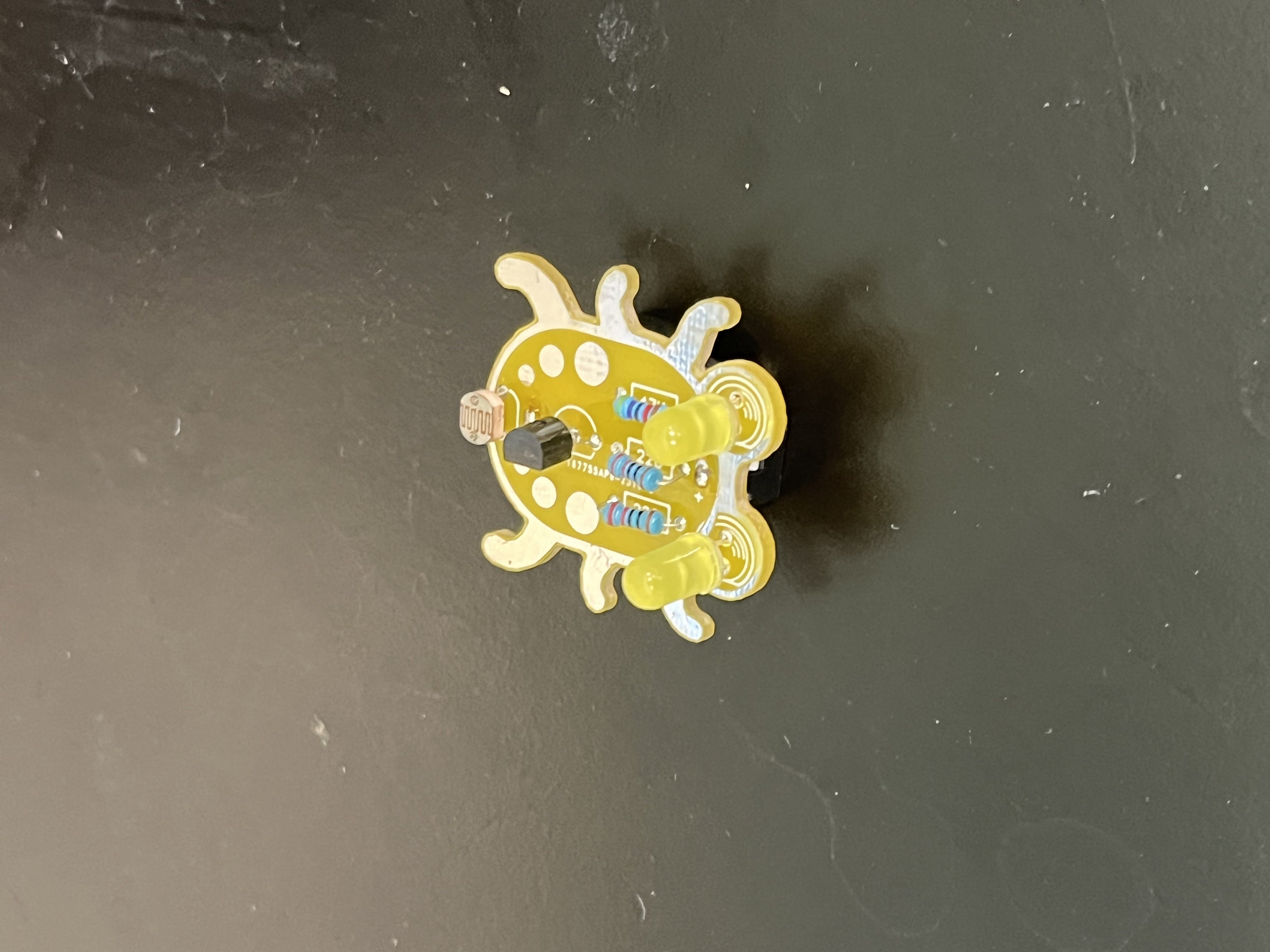
My starter project was Weevil Eyes. In this project, I soldered a couple individual components onto a circuit board. The end product is a tiny device with LEDs and a photoresistor that lights up when it senses a lack of light around it. This works with a battery providing power to LEDs and a transistor blocking the flow of power until the photoresistor resists nothing. This typically occurs when there is no light falling on it.
Bill of Materials
| Part | Note | Price | Link |
|---|---|---|---|
| CanaKit Raspberry Pi 4 Starter Kit | Image processing | $119.99 | Link |
| Haiway 10.1 Inch Monitor | Initial setup of Pi and minor adjustments | $84.96 | Link |
| Logitech K120 Keyboard | Basic input | $12.34 | Link |
| Logitech B100 Mouse | Basic input | $7.99 | Link |